华为的SP333和SP380网卡应该就是MCX4121A-XCAT和MCX4121A-ACAT的OEM版本,本文主要介绍如何将10G的网卡SP333刷入25G网卡固件从而变为25G网卡。
准备工作
固件我们直接去官网下载
# 官方的固件下载地址
https://network.nvidia.com/support/firmware/connectx4lxen/

# 刷固件需要用到的MFT工具
https://network.nvidia.com/products/adapter-software/firmware-tools/

# 网卡驱动
https://network.nvidia.com/products/adapter-software/ethernet/windows/winof-2/
华子的网卡固件在官网没办法下载,但是在超聚合官网可以下载
https://support.xfusion.com/support/#/zh/software-basics/d4b7de78-c4c0-46db-bbbd-98926e13e2da
关于SP333和SP380这两个型号的华子官网介绍
# SP333是2*10GE SFP+,向下兼容1GE速率(使用10GE SFP+光模块)。
https://support.huawei.com/enterprise/zh/doc/EDOC1100198574/672e0978
# SP380是2*25GE SFP28,向下兼容10GE速率(使用10G SFP+光模块)。
https://support.huawei.com/enterprise/zh/doc/EDOC1100056515/c20b2897
根据之前对MCX4网卡的了解,这两个应该就是MCX4121A-XCAT和MCX4121A-ACAT的OEM版本
https://network.nvidia.com/files/doc-2020/pb-connectx-4-lx-en-card.pdf
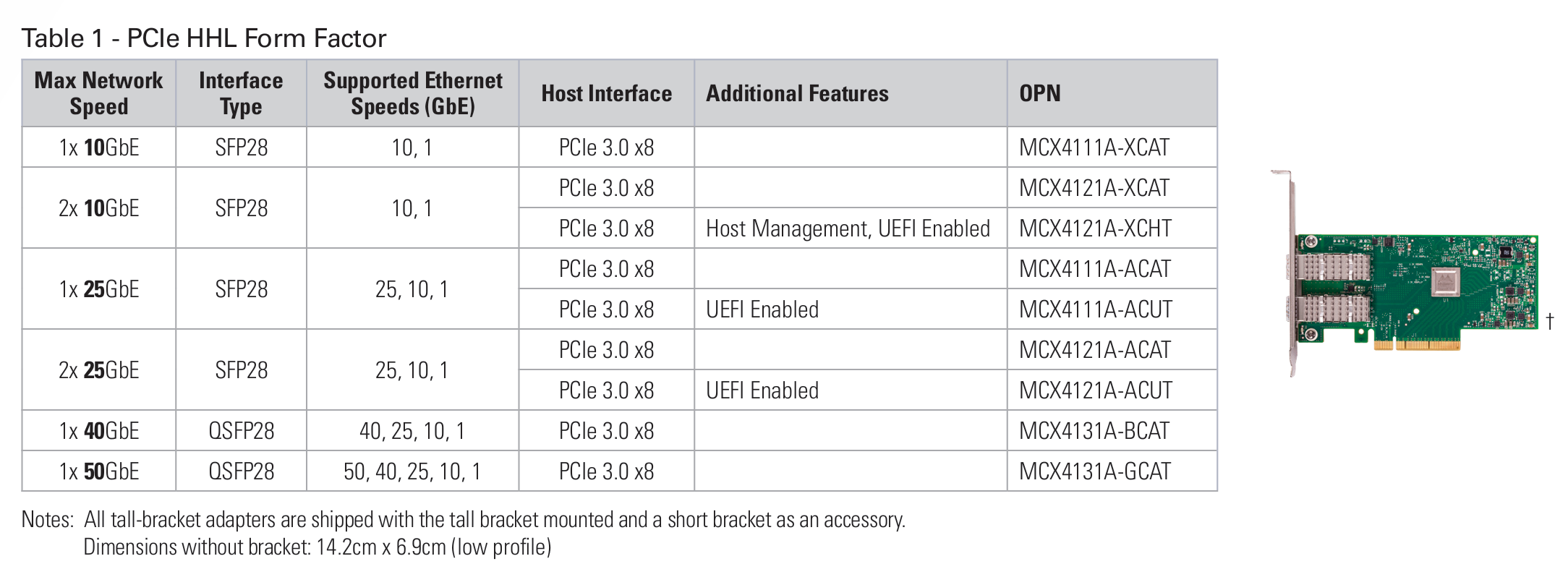
这里需要提前说一下结论,这里刷固件的时候分别刷入了mellanox官方的MCX4121A-ACAT固件和华为的SP380固件:
刷入mellanox官方固件的时候,网卡只有一个网口能正常识别到模块,另一个网口在系统中能看到网卡,但是无法识别线缆(手头的AOC和DAC都不行,换另一个网口则都正常),并且正常识别的网卡在win11中没办法正常通过DHCP获取IP(其他系统暂时没测试)
刷入华为的SP380固件的时候,网卡信息能正常识别,两个网口各项功能看起来正常。建议还是刷入华为的固件比较稳妥。
windows 刷机
刷机命令参考如下
flint --no_fw_ctrl -allow_psid_change -d {设备号} -i {文件路径(注:这里最好为根目录下,如不为根目录注意目录名中不要含有中文)} burn
这里我用powershell执行的命令参考如下:
PS C:\Users\Mr7th\Desktop\NIC-SP380-CX4Lx-FW-14.31.1014> flint --no_fw_ctrl -allow_psid_change -d mt4117_pciconf0 -i .\fw-ConnectX4Lx-rel-14_31_1014_H_SP380-FlexBoot-3.6.403_4117_14_24_13_RELEASE_X64_AARCH64_20210706_VPD.bin burn
Done.
    Current FW version on flash:  14.32.1900
    New FW version:               14.31.1014

    Note: The new FW version is older than the current FW version on flash.

 Do you want to continue ? (y/n) [n] : y


    You are about to replace current PSID on flash - "MT_2420110034" with a different PSID - "HUA0000000023".
    Note: It is highly recommended not to change the PSID.

 Do you want to continue ? (y/n) [n] : y
Burning FW image without signatures - OK
Restoring signature                     - OK
-I- To load new FW run mlxfwreset or reboot machine.
刷固件需要等待挺长一段时间的,要有耐心,刷完之后我们使用mlxfwmanager命令检查当前固件信息
PS C:\Users\Mr7th\Desktop\NIC-SP380-CX4Lx-FW-14.31.1014> mlxfwmanager
Querying Mellanox devices firmware ...

Device #1:
----------

  Device Type:      ConnectX4LX
  Part Number:      MCX4121A-ACA_Ax
  Description:      ConnectX-4 Lx EN network interface card; 25GbE dual-port SFP28; PCIe3.0 x8; ROHS R6
  PSID:             MT_2420110034
  PCI Device Name:  mt4117_pciconf0
  Base MAC:         N/A
  Versions:         Current        Available
     FW             14.31.1014     N/A
     FW (Running)   14.32.1900     N/A
     PXE            3.6.0502       N/A
     UEFI           14.25.0017     N/A

  Status:           No matching image found
看起来没问题,我们直接重启电脑,再看看网卡的信息
PS C:\Users\Mr7th> mlxfwmanager
Querying Mellanox devices firmware ...

Device #1:
----------

  Device Type:      ConnectX4LX
  Part Number:      Huawei_SP380_ConnectX4Lx_2P_25GbE_Ax
  Description:      Huawei SP380 2-port 25G Ethernet Adapter PCIE Gen3 x8
  PSID:             HUA0000000023
  PCI Device Name:  mt4117_pciconf0
  Base MAC:         N/A
  Versions:         Current        Available
     FW             14.31.1014     N/A
     PXE            3.6.0403       N/A
     UEFI           14.24.0013     N/A

  Status:           No matching image found


PS C:\Users\Mr7th> flint -d mt4117_pciconf0 q
Image type:            FS3
FW Version:            14.31.1014
FW Release Date:       30.6.2021
Product Version:       14.31.1014
Rom Info:              type=UEFI version=14.24.13 cpu=AMD64,AARCH64
                       type=PXE version=3.6.403 cpu=AMD64
Description:           UID                GuidsNumber
Base GUID:             N/A                     8
Base MAC:              N/A                     8
Image VSD:             N/A
Device VSD:            N/A
PSID:                  HUA0000000023
Security Attributes:   N/A
按下win+R键,输入ncpa.cpl进去管理界面查看网卡信息
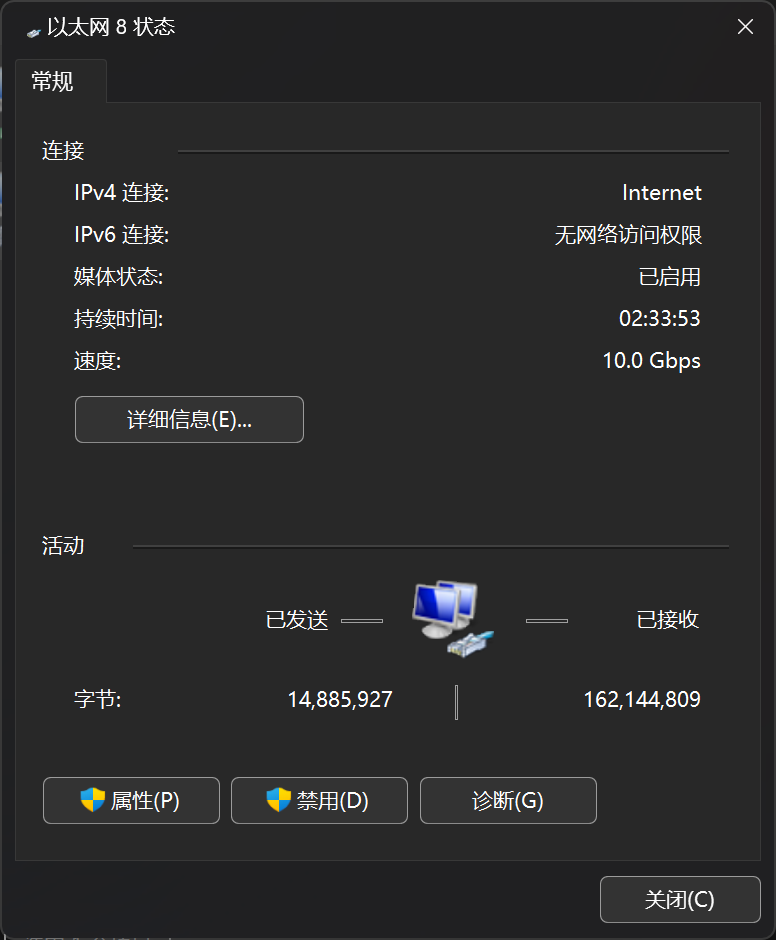
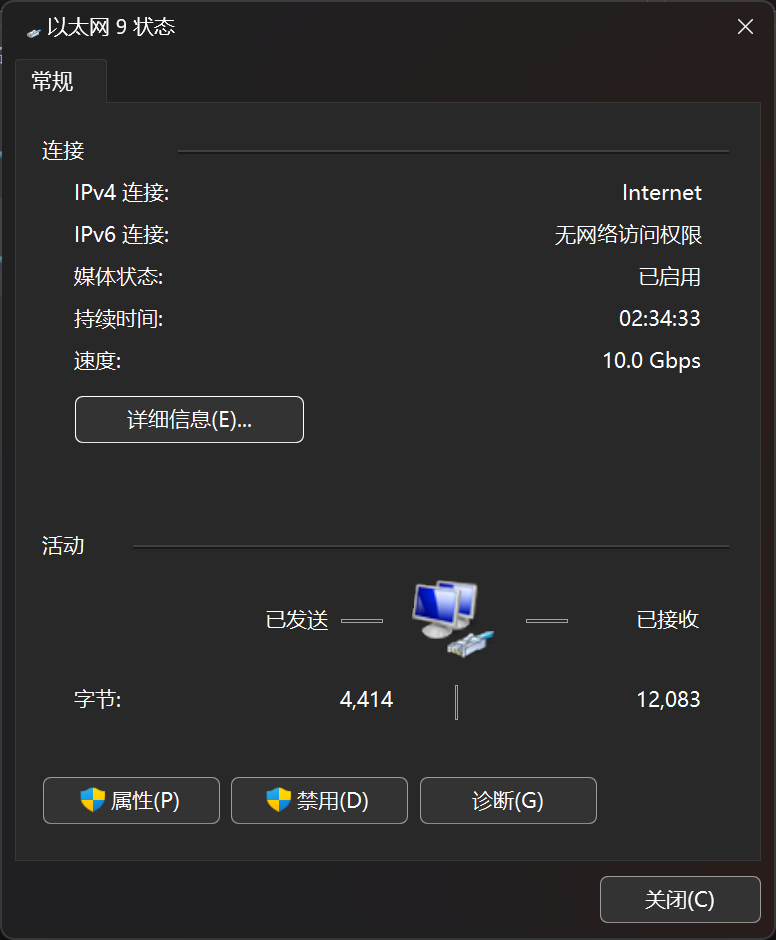
可以看到这两个网卡都正常协商到了10G速率(只有10G交换机),并且都通过DHCP的方式正常获取到了IP、DNS等信息
也可以通过下面这两个命令来查看网卡的速率信息
PS C:\Users\Mr7th> wmic nic where netEnabled=true get name,speed
Name                                        Speed
Realtek Gaming 2.5GbE Family Controller #2  2500000000
Mellanox ConnectX-4 Lx Ethernet Adapter #5  10000000000
Mellanox ConnectX-4 Lx Ethernet Adapter #6  10000000000

PS C:\Users\Mr7th> Get-NetAdapter | select interfaceDescription,name,status,linkSpeed

interfaceDescription                        name                  Status       LinkSpeed
--------------------                        ----                  ------       ---------
Mellanox ConnectX-4 Lx Ethernet Adapter #6  以太网 9              Up           10 Gbps
Mellanox ConnectX-4 Lx Ethernet Adapter #5  以太网 8              Up           10 Gbps
Intel(R) Wi-Fi 6E AX211 160MHz              AX211                 Disconnected 0 bps
Bluetooth Device (Personal Area Network) #3 蓝牙网络连接 3        Disconnected 3 Mbps
Realtek Gaming 2.5GbE Family Controller #2  Realtek Gaming 2.5GbE Up           2.5 Gbps
进到unraid里面之后我们能看到速率有25G的选项,说明正常
root@tiny-unraid:~# ethtool eth0
Settings for eth0:
        Supported ports: [ Backplane ]
        Supported link modes:   1000baseKX/Full
                                10000baseKR/Full
                                25000baseCR/Full
                                25000baseKR/Full
                                25000baseSR/Full
        Supported pause frame use: Symmetric
        Supports auto-negotiation: Yes
        Supported FEC modes: None        RS      BASER
        Advertised link modes:  1000baseKX/Full
                                10000baseKR/Full
                                25000baseCR/Full
                                25000baseKR/Full
                                25000baseSR/Full
        Advertised pause frame use: Symmetric
        Advertised auto-negotiation: Yes
        Advertised FEC modes: None
        Speed: 10000Mb/s
        Duplex: Full
        Auto-negotiation: on
        Port: Direct Attach Copper
        PHYAD: 0
        Transceiver: internal
        Supports Wake-on: d
        Wake-on: d
        Link detected: yes
root@tiny-unraid:~# ethtool eth1
Settings for eth1:
        Supported ports: [ Backplane ]
        Supported link modes:   1000baseKX/Full
                                10000baseKR/Full
                                25000baseCR/Full
                                25000baseKR/Full
                                25000baseSR/Full
        Supported pause frame use: Symmetric
        Supports auto-negotiation: Yes
        Supported FEC modes: None        RS      BASER
        Advertised link modes:  1000baseKX/Full
                                10000baseKR/Full
                                25000baseCR/Full
                                25000baseKR/Full
                                25000baseSR/Full
        Advertised pause frame use: Symmetric
        Advertised auto-negotiation: Yes
        Advertised FEC modes: None
        Speed: 10000Mb/s
        Duplex: Full
        Auto-negotiation: on
        Port: Direct Attach Copper
        PHYAD: 0
        Transceiver: internal
        Supports Wake-on: d
        Wake-on: d
        Link detected: yes
unraid 刷机
unraid原生并不自带mft刷机工具,因此我们要到APPS里面找到Mellanox-Firmware-Tools并下载安装,这个是MFT的一个开源实现版本,大部分功能逻辑和官方版本是几乎一致的。
开始之前,先使用ethtool工具可以查看网卡信息
root@tiny-unraid:~# ethtool -i eth1
driver: mlx5_core
version: 6.6.68-Unraid
firmware-version: 14.17.1010 (HUA0010110034)
expansion-rom-version:
bus-info: 0000:01:00.1
supports-statistics: yes
supports-test: yes
supports-eeprom-access: no
supports-register-dump: no
supports-priv-flags: yes
通过系统自带的lspci查看网卡信息
root@tiny-unraid:~# lspci -nnv

01:00.0 Ethernet controller [0200]: Mellanox Technologies MT27710 Family [ConnectX-4 Lx] [15b3:1015]
        Subsystem: Mellanox Technologies Device [15b3:df30]
        Flags: bus master, fast devsel, latency 0, IRQ 16, IOMMU group 14
        Memory at 60e2000000 (64-bit, prefetchable) [size=32M]
        Expansion ROM at 80e00000 [disabled] [size=1M]
        Capabilities: [60] Express Endpoint, IntMsgNum 0
        Capabilities: [48] Vital Product Data
        Capabilities: [9c] MSI-X: Enable+ Count=64 Masked-
        Capabilities: [c0] Vendor Specific Information: Len=18 <?>
        Capabilities: [40] Power Management version 3
        Capabilities: [100] Alternative Routing-ID Interpretation (ARI)
        Capabilities: [110] Advanced Error Reporting
        Capabilities: [180] Single Root I/O Virtualization (SR-IOV)
        Capabilities: [1c0] Secondary PCI Express
        Capabilities: [230] Access Control Services
        Kernel driver in use: vfio-pci
        Kernel modules: mlx5_core

01:00.1 Ethernet controller [0200]: Mellanox Technologies MT27710 Family [ConnectX-4 Lx] [15b3:1015]
        Subsystem: Mellanox Technologies Device [15b3:df30]
        Flags: bus master, fast devsel, latency 0, IRQ 17, IOMMU group 15
        Memory at 60e0000000 (64-bit, prefetchable) [size=32M]
        Expansion ROM at 80d00000 [disabled] [size=1M]
        Capabilities: [60] Express Endpoint, IntMsgNum 0
        Capabilities: [48] Vital Product Data
        Capabilities: [9c] MSI-X: Enable+ Count=64 Masked-
        Capabilities: [c0] Vendor Specific Information: Len=18 <?>
        Capabilities: [40] Power Management version 3
        Capabilities: [100] Alternative Routing-ID Interpretation (ARI)
        Capabilities: [110] Advanced Error Reporting
        Capabilities: [180] Single Root I/O Virtualization (SR-IOV)
        Capabilities: [230] Access Control Services
        Kernel driver in use: mlx5_core
        Kernel modules: mlx5_core
查看网卡信息
root@tiny-unraid:~# mstconfig -d 01:00.0 query

Device #1:
----------

Device type:        ConnectX4LX
Name:               N/A
Description:        N/A
Device:             01:00.0

Configurations:                                     Next Boot
        ROCE_NEXT_PROTOCOL                          254
        NUM_PF_MSIX_VALID                           True(1)
        NUM_OF_VFS                                  8
        NUM_OF_PF                                   2
        SRIOV_EN                                    True(1)
        PF_LOG_BAR_SIZE                             5
        VF_LOG_BAR_SIZE                             0
        NUM_PF_MSIX                                 63
        NUM_VF_MSIX                                 11
        INT_LOG_MAX_PAYLOAD_SIZE                    AUTOMATIC(0)
        CQE_COMPRESSION                             BALANCED(0)
        PCI_ATOMIC_MODE                             PCI_ATOMIC_DISABLED_EXT_ATOMIC_ENABLED(0)
        LRO_LOG_TIMEOUT0                            6
        LRO_LOG_TIMEOUT1                            7
        LRO_LOG_TIMEOUT2                            8
        LRO_LOG_TIMEOUT3                            12
        LOG_DCR_HASH_TABLE_SIZE                     14
        MAX_PACKET_LIFETIME                         61
        DCR_LIFO_SIZE                               16384
        NUM_OF_PLANES_P1                            0
        NUM_OF_PLANES_P2                            0
        IB_PROTO_WIDTH_EN_MASK_P1                   0
        IB_PROTO_WIDTH_EN_MASK_P2                   0
        ROCE_CC_PRIO_MASK_P1                        0
        ROCE_CC_CNP_MODERATION_P1                   DEVICE_DEFAULT(0)
        ROCE_CC_PRIO_MASK_P2                        0
        ROCE_CC_CNP_MODERATION_P2                   DEVICE_DEFAULT(0)
        CLAMP_TGT_RATE_AFTER_TIME_INC_P1            True(1)
        CLAMP_TGT_RATE_P1                           False(0)
        RPG_TIME_RESET_P1                           600
        RPG_BYTE_RESET_P1                           32767
        RPG_THRESHOLD_P1                            5
        RPG_MAX_RATE_P1                             0
        RPG_AI_RATE_P1                              5
        RPG_HAI_RATE_P1                             50
        RPG_GD_P1                                   11
        RPG_MIN_DEC_FAC_P1                          50
        RPG_MIN_RATE_P1                             1
        RATE_TO_SET_ON_FIRST_CNP_P1                 100
        DCE_TCP_G_P1                                4
        DCE_TCP_RTT_P1                              1
        RATE_REDUCE_MONITOR_PERIOD_P1               4
        INITIAL_ALPHA_VALUE_P1                      0
        MIN_TIME_BETWEEN_CNPS_P1                    0
        CNP_802P_PRIO_P1                            0
        CNP_DSCP_P1                                 7
        CLAMP_TGT_RATE_AFTER_TIME_INC_P2            True(1)
        CLAMP_TGT_RATE_P2                           False(0)
        RPG_TIME_RESET_P2                           600
        RPG_BYTE_RESET_P2                           32767
        RPG_THRESHOLD_P2                            5
        RPG_MAX_RATE_P2                             0
        RPG_AI_RATE_P2                              5
        RPG_HAI_RATE_P2                             50
        RPG_GD_P2                                   11
        RPG_MIN_DEC_FAC_P2                          50
        RPG_MIN_RATE_P2                             1
        RATE_TO_SET_ON_FIRST_CNP_P2                 100
        DCE_TCP_G_P2                                4
        DCE_TCP_RTT_P2                              1
        RATE_REDUCE_MONITOR_PERIOD_P2               4
        INITIAL_ALPHA_VALUE_P2                      0
        MIN_TIME_BETWEEN_CNPS_P2                    0
        CNP_802P_PRIO_P2                            0
        CNP_DSCP_P2                                 7
        LLDP_NB_DCBX_P1                             False(0)
        LLDP_NB_RX_MODE_P1                          OFF(0)
        LLDP_NB_TX_MODE_P1                          OFF(0)
        LLDP_NB_DCBX_P2                             False(0)
        LLDP_NB_RX_MODE_P2                          OFF(0)
        LLDP_NB_TX_MODE_P2                          OFF(0)
        ROCE_RTT_RESP_DSCP_P1                       0
        ROCE_RTT_RESP_DSCP_MODE_P1                  DEVICE_DEFAULT(0)
        ROCE_RTT_RESP_DSCP_P2                       0
        ROCE_RTT_RESP_DSCP_MODE_P2                  DEVICE_DEFAULT(0)
        DCBX_IEEE_P1                                True(1)
        DCBX_CEE_P1                                 True(1)
        DCBX_WILLING_P1                             True(1)
        DCBX_IEEE_P2                                True(1)
        DCBX_CEE_P2                                 True(1)
        DCBX_WILLING_P2                             True(1)
        KEEP_ETH_LINK_UP_P1                         False(0)
        KEEP_IB_LINK_UP_P1                          False(0)
        KEEP_LINK_UP_ON_BOOT_P1                     False(0)
        KEEP_LINK_UP_ON_STANDBY_P1                  False(0)
        KEEP_ETH_LINK_UP_P2                         False(0)
        KEEP_IB_LINK_UP_P2                          False(0)
        KEEP_LINK_UP_ON_BOOT_P2                     False(0)
        KEEP_LINK_UP_ON_STANDBY_P2                  False(0)
        NUM_OF_VL_P1                                _4_VLs(3)
        NUM_OF_TC_P1                                _8_TCs(0)
        NUM_OF_PFC_P1                               8
        NUM_OF_VL_P2                                _4_VLs(3)
        NUM_OF_TC_P2                                _8_TCs(0)
        NUM_OF_PFC_P2                               8
        DUP_MAC_ACTION_P1                           LAST_CFG(0)
        DUP_MAC_ACTION_P2                           LAST_CFG(0)
        PORT_OWNER                                  True(1)
        ALLOW_RD_COUNTERS                           True(1)
        RENEG_ON_CHANGE                             True(1)
        TRACER_ENABLE                               False(0)
        IP_VER                                      IPv4(0)
        BOOT_UNDI_NETWORK_WAIT                      0
        BOOT_VLAN                                   1
        LEGACY_BOOT_PROTOCOL                        PXE(1)
        BOOT_VLAN_EN                                False(0)
        BOOT_PKEY                                   0
查看固件版本信息
root@tiny-unraid:~# mstflint -d 01:00.0 q
Image type:            FS3
FW Version:            14.17.1010
FW Release Date:       22.9.2016
Rom Info:              type=PXE version=3.4.903
Description:           UID                GuidsNumber
Base GUID:             e868190300c8f3b8        8
Orig Base GUID:        N/A                     8
Base MAC:              e86819c8ebcc            8
Orig Base MAC:         N/A                     8
Image VSD:             N/A
Device VSD:            N/A
PSID:                  HUA0010110034
Security Attributes:   N/A
检查image信息
root@tiny-unraid:~# mstflint -d 01:00.0 v

FS3 failsafe image

     /0x00000038-0x0000173b (0x001704)/ (BOOT2) - OK
     /0x00002000-0x0000201f (0x000020)/ (ITOC_HEADER) - OK
     /0x00004000-0x000040ff (0x000100)/ (RESET_INFO) - OK
     /0x00005000-0x00005fff (0x001000)/ (FW_MAIN_CFG) - OK
     /0x00006000-0x000064bf (0x0004c0)/ (FW_BOOT_CFG) - OK
     /0x00007000-0x00007aff (0x000b00)/ (HW_MAIN_CFG) - OK
     /0x00008000-0x0000813f (0x000140)/ (HW_BOOT_CFG) - OK
     /0x00009000-0x0000c4ff (0x003500)/ (PHY_UC_CONSTS) - OK
     /0x0000d000-0x0000d13f (0x000140)/ (IMAGE_SIGNATURE_256) - OK
     /0x0000e000-0x0000e13f (0x000140)/ (PUBLIC_KEYS_2048) - OK
     /0x0000f000-0x00030a13 (0x021a14)/ (ROM_CODE) - OK
     /0x00031000-0x0003133f (0x000340)/ (PCIE_PHY_UC_CODE) - OK
     /0x00032000-0x00039d7f (0x007d80)/ (PHY_UC_CODE) - OK
     /0x0003a000-0x00063b33 (0x029b34)/ (PCI_CODE) - OK
     /0x00064000-0x00074f03 (0x010f04)/ (IRON_PREP_CODE) - OK
     /0x00075000-0x0029c6ff (0x227700)/ (MAIN_CODE) - OK
     /0x0029d000-0x002aca23 (0x00fa24)/ (PCIE_LINK_CODE) - OK
     /0x002ad000-0x002b0487 (0x003488)/ (POST_IRON_BOOT_CODE) - OK
     /0x002b1000-0x002b3ba7 (0x002ba8)/ (UPGRADE_CODE) - OK
     /0x002b4000-0x002b43ff (0x000400)/ (IMAGE_INFO) - OK
     /0x002b4400-0x002d364f (0x01f250)/ (FW_ADB) - OK
     /0x002d3650-0x002d3e27 (0x0007d8)/ (DBG_FW_INI) - OK
     /0x002d3e28-0x002d3e2f (0x000008)/ (DBG_FW_PARAMS) - OK
     /0x00fa0000-0x00faffff (0x010000)/ (NV_DATA) - CRC IGNORED
     /0x00fb0000-0x00fbffff (0x010000)/ (NV_DATA) - CRC IGNORED
     /0x00fc0000-0x00fcffff (0x010000)/ (FW_NV_LOG) - CRC IGNORED
     /0x00fee000-0x00fee1ff (0x000200)/ (DEV_INFO) - OK
     /0x00ff8000-0x00ff813f (0x000140)/ (MFG_INFO) - OK
     /0x00ff8140-0x00ff813f (0x000000)/ (VPD_R0) - OK

-I- FW image verification succeeded. Image is bootable.
解压下载好的安装包
root@tiny-unraid:~# unzip NIC-SP380-CX4Lx-FW-14.31.1014.zip
Archive:  NIC-SP380-CX4Lx-FW-14.31.1014.zip
  inflating: version.xml
  inflating: install.sh
  inflating: fw-ConnectX4Lx-rel-14_31_1014_H_SP380-FlexBoot-3.6.403_4117_14_24_13_RELEASE_X64_AARCH64_20210706_VPD.bin
   creating: tools/
  inflating: tools/mdevices_info
  inflating: tools/mstop
  inflating: tools/flint
  inflating: tools/flint_ext
  inflating: tools/minit
  inflating: tools/mst
  inflating: tools/mcra
   creating: drivers/
同样的操作可以检查固件信息
root@tiny-unraid:~# mstflint -i fw-ConnectX4Lx-rel-14_31_1014_H_SP380-FlexBoot-3.6.403_4117_14_24_13_RELEASE_X64_AARCH64_20210706_VPD.bin v

FS3 failsafe image

     /0x00000038-0x00001d97 (0x001d60)/ (BOOT2) - OK
     /0x00002000-0x0000201f (0x000020)/ (ITOC_HEADER) - OK
     /0x00004000-0x00013dd3 (0x00fdd4)/ (IRON_PREP_CODE) - OK
     /0x00014000-0x000140ff (0x000100)/ (RESET_INFO) - OK
     /0x00015000-0x00015bff (0x000c00)/ (FW_MAIN_CFG) - OK
     /0x00016000-0x0001647f (0x000480)/ (FW_BOOT_CFG) - OK
     /0x00017000-0x000185ff (0x001600)/ (HW_MAIN_CFG) - OK
     /0x00019000-0x0001913f (0x000140)/ (HW_BOOT_CFG) - OK
     /0x0001a000-0x0001cc7f (0x002c80)/ (PHY_UC_CONSTS) - OK
     /0x0001d000-0x0001d13f (0x000140)/ (IMAGE_SIGNATURE_256) - OK
     /0x0001e000-0x0001e8ff (0x000900)/ (PUBLIC_KEYS_2048) - OK
     /0x0001f000-0x0001f08f (0x000090)/ (FORBIDDEN_VERSIONS) - OK
     /0x00020000-0x0002023f (0x000240)/ (IMAGE_SIGNATURE_512) - OK
     /0x00021000-0x000220ff (0x001100)/ (PUBLIC_KEYS_4096) - OK
     /0x00023000-0x00072fff (0x050000)/ (PROGRAMMABLE_HW_FW) - OK
     /0x00073000-0x00123827 (0x0b0828)/ (ROM_CODE) - OK
     /0x00124000-0x00133fff (0x010000)/ (CRDUMP_MASK_DATA) - OK
     /0x00134000-0x001349ff (0x000a00)/ (PCIE_PHY_UC_CODE) - OK
     /0x00135000-0x0013e91f (0x009920)/ (PHY_UC_CODE) - OK
     /0x0013f000-0x0016a4e7 (0x02b4e8)/ (PCI_CODE) - OK
     /0x0016b000-0x004ab11f (0x340120)/ (MAIN_CODE) - OK
     /0x004ac000-0x004b9c5f (0x00dc60)/ (PCIE_LINK_CODE) - OK
     /0x004ba000-0x004bae3f (0x000e40)/ (POST_IRON_BOOT_CODE) - OK
     /0x004bb000-0x004bcbfb (0x001bfc)/ (UPGRADE_CODE) - OK
     /0x004bd000-0x004bd3ff (0x000400)/ (IMAGE_INFO) - OK
     /0x004bd400-0x004bdf53 (0x000b54)/ (DBG_FW_INI) - OK
     /0x004bdf54-0x004bdf5b (0x000008)/ (DBG_FW_PARAMS) - OK
     /0x00fa0000-0x00faffff (0x010000)/ (NV_DATA) - CRC IGNORED
     /0x00fb0000-0x00fbffff (0x010000)/ (NV_DATA) - CRC IGNORED
     /0x00fc0000-0x00fcffff (0x010000)/ (FW_NV_LOG) - CRC IGNORED
     /0x00fee000-0x00fee1ff (0x000200)/ (DEV_INFO) - OK
     /0x00ff8000-0x00ff813f (0x000140)/ (MFG_INFO) - OK
     /0x00ff8140-0x00ff81bf (0x000080)/ (VPD_R0) - OK

-I- FW image verification succeeded. Image is bootable.
更新固件完成后
root@tiny-unraid:~# mstflint --no_fw_ctrl -allow_psid_change -d 01:00.0 -i fw-ConnectX4Lx-rel-14_31_1014_H_SP380-FlexBoot-3.6.403_4117_14_24_13_RELEASE_X64_AARCH64_20210706_VPD.bin burn
Done.
    Current FW version on flash:  14.17.1010
    New FW version:               14.31.1014


    You are about to replace current PSID on flash - "HUA0010110034" with a different PSID - "HUA0000000023".
    Note: It is highly recommended not to change the PSID.

 Do you want to continue ? (y/n) [n] : y
Burning FW image without signatures - OK
Restoring signature                     - OK
-I- To load new FW run mstfwreset or reboot machine.
我们再次检查固件信息
root@tiny-unraid:~# mstflint -d 01:00.0 q
Image type:            FS3
FW Version:            14.31.1014
FW Version(Running):   14.17.1010
FW Release Date:       30.6.2021
Rom Info:              type=UEFI version=14.24.13 cpu=AMD64,AARCH64
                       type=PXE version=3.6.403 cpu=AMD64
Description:           UID                GuidsNumber
Base GUID:             e868190300c8f3b8        8
Orig Base GUID:        N/A                     8
Base MAC:              e86819c8ebcc            8
Orig Base MAC:         N/A                     8
Image VSD:             N/A
Device VSD:            N/A
PSID:                  HUA0000000023
Orig PSID:             HUA0010110034
Security Attributes:   N/A
注意这个时候固件可以看到running版本和非running版本,我们通过ethtool查看当前的固件版本会发现新刷入的固件版本并未生效,需要重启
root@tiny-unraid:~# ethtool -i eth1
driver: mlx5_core
version: 6.6.68-Unraid
firmware-version: 14.17.1010 (HUA0010110034)
expansion-rom-version:
bus-info: 0000:01:00.1
supports-statistics: yes
supports-test: yes
supports-eeprom-access: no
supports-register-dump: no
supports-priv-flags: yes
重启机器之后查看网卡信息可以发现固件版本和网卡速率都是正常
root@tiny-unraid:~# ethtool eth1
Settings for eth1:
        Supported ports: [ Backplane ]
        Supported link modes:   1000baseKX/Full
                                10000baseKR/Full
                                25000baseCR/Full
                                25000baseKR/Full
                                25000baseSR/Full
        Supported pause frame use: Symmetric
        Supports auto-negotiation: Yes
        Supported FEC modes: None        RS      BASER
        Advertised link modes:  1000baseKX/Full
                                10000baseKR/Full
                                25000baseCR/Full
                                25000baseKR/Full
                                25000baseSR/Full
        Advertised pause frame use: Symmetric
        Advertised auto-negotiation: Yes
        Advertised FEC modes: None
        Speed: 10000Mb/s
        Duplex: Full
        Auto-negotiation: on
        Port: Direct Attach Copper
        PHYAD: 0
        Transceiver: internal
        Supports Wake-on: d
        Wake-on: d
        Link detected: yes
root@tiny-unraid:~# ethtool -i eth1
driver: mlx5_core
version: 6.6.68-Unraid
firmware-version: 14.31.1014 (HUA0000000023)
expansion-rom-version:
bus-info: 0000:01:00.1
supports-statistics: yes
supports-test: yes
supports-eeprom-access: no
supports-register-dump: no
supports-priv-flags: yes
这里建议不要刷入mellanox官方的固件(虽然看起来网卡的速度正常,但是却无法正确识别到光模块和线缆),使用华为的官方固件即可,刷入的方法是一样的。